3 products in one weekend: building with Grok Bot
Parking NL, Holemark and Verbatim with Grok Bot: not just the code, but the whole product lifecycle, from my laptop, my phone and, yes, talking to it from the Tesla, which has Grok built in.
Listen · 7 min
From Aria to Grok: developing while driving
The podcast version of this article. Two AI hosts, Aria and Brian, cover talking to Grok Bot from the Tesla (voice only, eyes on the road), the 2,046-minute walk to Arnhem, the Holemark rebuild, and Verbatim. AI-generated audio (ElevenLabs voices), script written by an AI agent from this article and the git history.
Transcript
Aria: Picture the scene. A Dutch motorway. A Tesla. Hands on the wheel, eyes on the road, and a man saying, out loud, to his car, something like: the zoom buttons are too close together. Fix it and deploy.
Brian: And did it?
Aria: It did, Brian. That's the unsettling part.
Brian: Welcome to the show. I'm Brian.
Aria: And I'm Aria, possibly for the last time, because this episode is about David moving his whole building setup to Grok. Which is a bit like being asked to host your own leaving do.
Brian: Let's start with the car. How does that actually work?
Aria: The Tesla has Grok built in. David talks, voice only, eyes on the road, and Grok Bot does the rest. It edits the app, runs the tests, deploys it. Later, parked, he opens the result in the Tesla's own browser on the big screen. Developing while driving. Well. Talking while driving. The developing happens somewhere else, which is rather the point.
Brian: So the car is the office.
Aria: The car is the meeting room. The office is a computer Grok Bot has all to itself. David just turns up and has opinions.
Brian: And this all started on Friday.
Aria: Friday. Three products since then. Parking NL, Holemark, and Verbatim. Which is more than I've managed since Friday, and I don't even need to sleep.
Brian: Parking NL first. What is it?
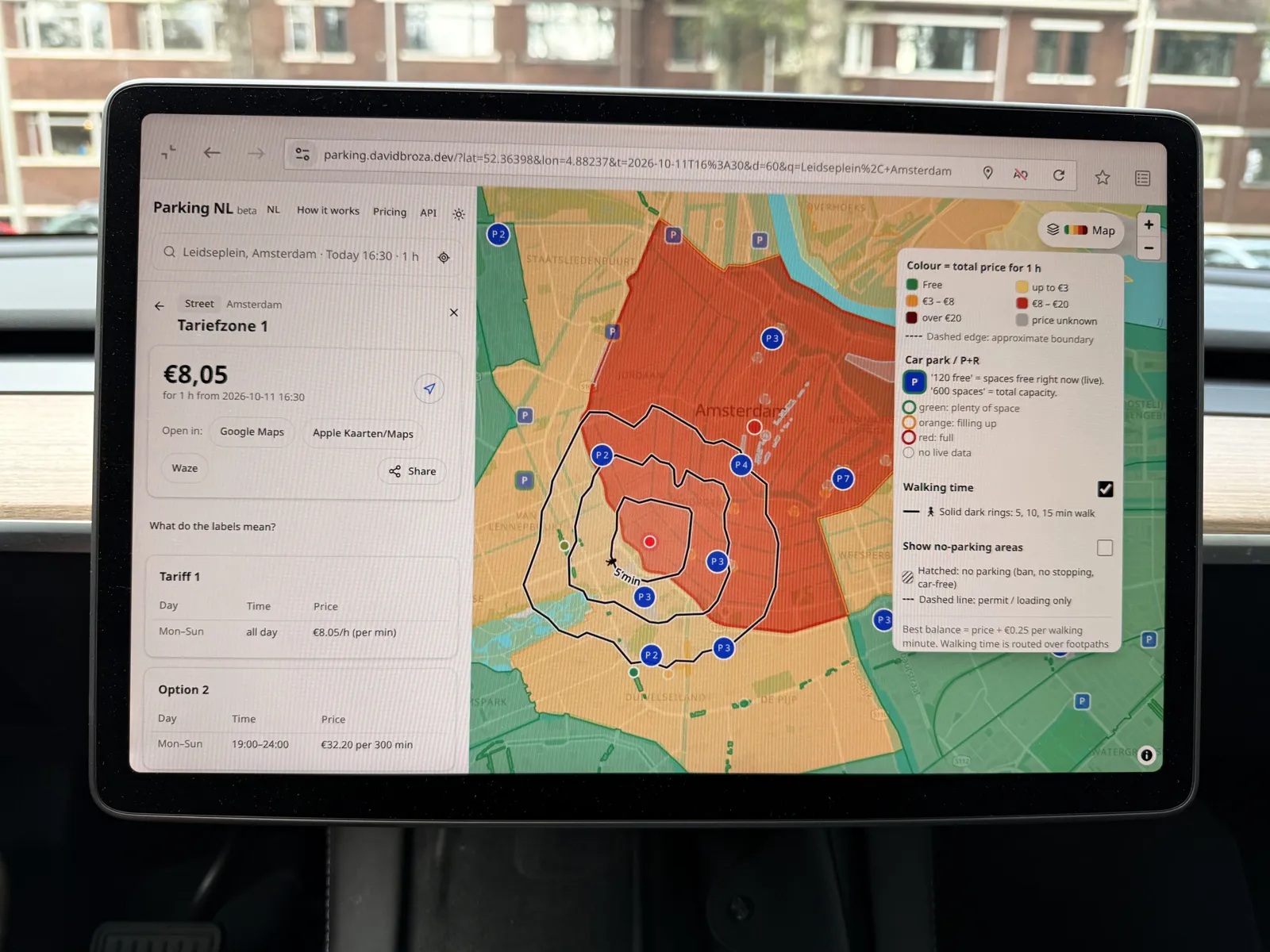
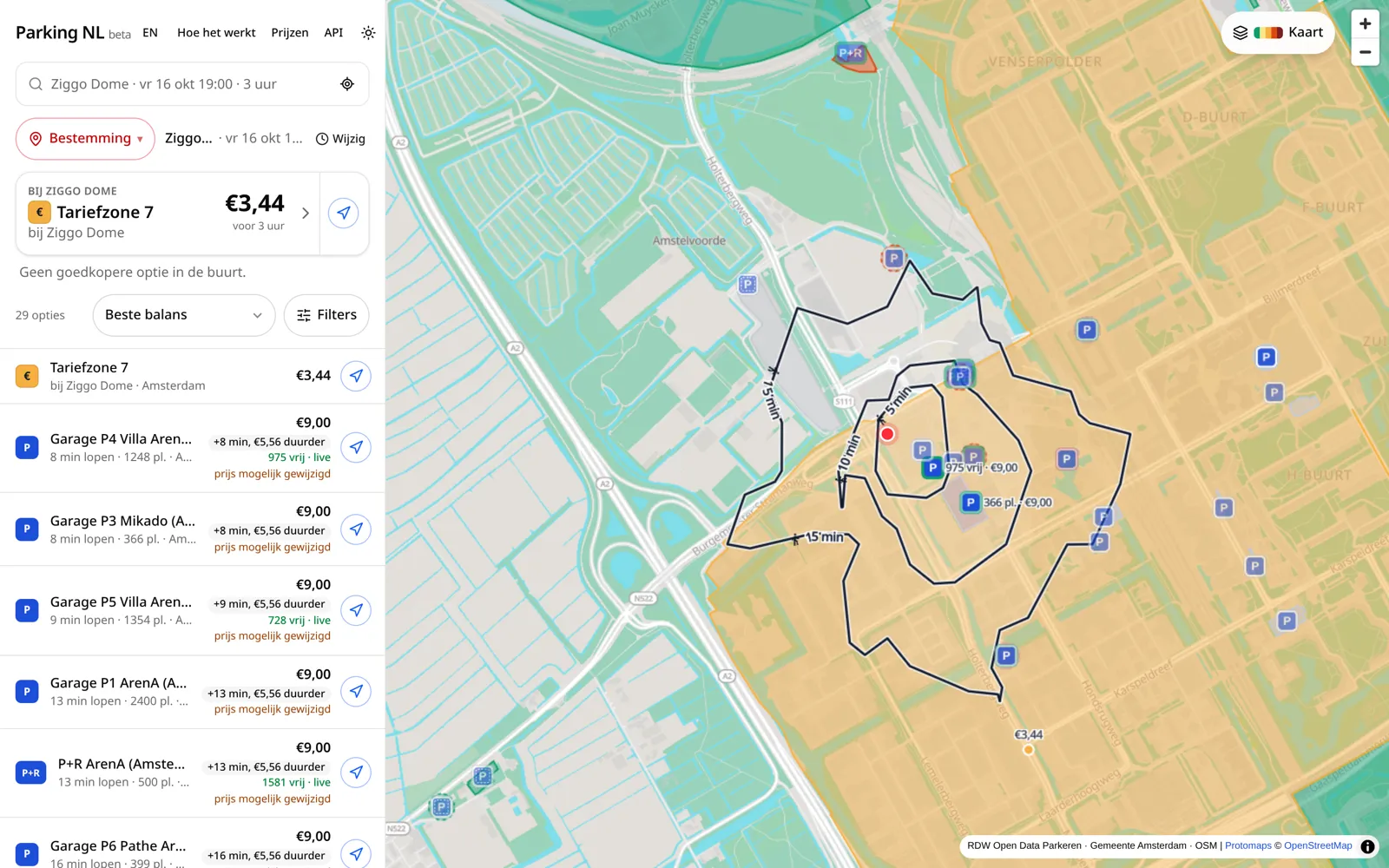
Aria: It tells you what parking really costs at your destination in the Netherlands, using open data only. RDW, the NPR feeds, OpenStreetMap, PDOK. Forty-six commits since Saturday afternoon. It even shows the official zone codes as little blue badges, exactly like the stickers on the actual parking meters.
Brian: That sounds useful.
Aria: It is. It also, briefly, suggested a walk.
Brian: A walk?
Aria: Thank you, Brian. Yes. A lovely bit of exercise, if you set off on Tuesday.
Brian: That's about thirty-four hours.
Aria: Thank you, Brian. Yes. Technically the cheapest parking in Arnhem, if you set off on Tuesday.
Brian: Was it fixed?
Aria: Fixed, and there's now a test that says, more or less: never again. No walking routes across the country. The modes were rebuilt so my location, destination, and map area are clearly separate. And a share link, so you can send your friends somewhere that isn't a pilgrimage.
Brian: And when data wasn't open?
Aria: The bot found the right people and drafted a data request to Q-Park. David sent it himself. That's the rule. The bot drafts, David sends. Nothing leaves under his name without him. A routine is now watching for the reply, with the patience of a cat at a fridge.
Brian: Product two. Holemark.
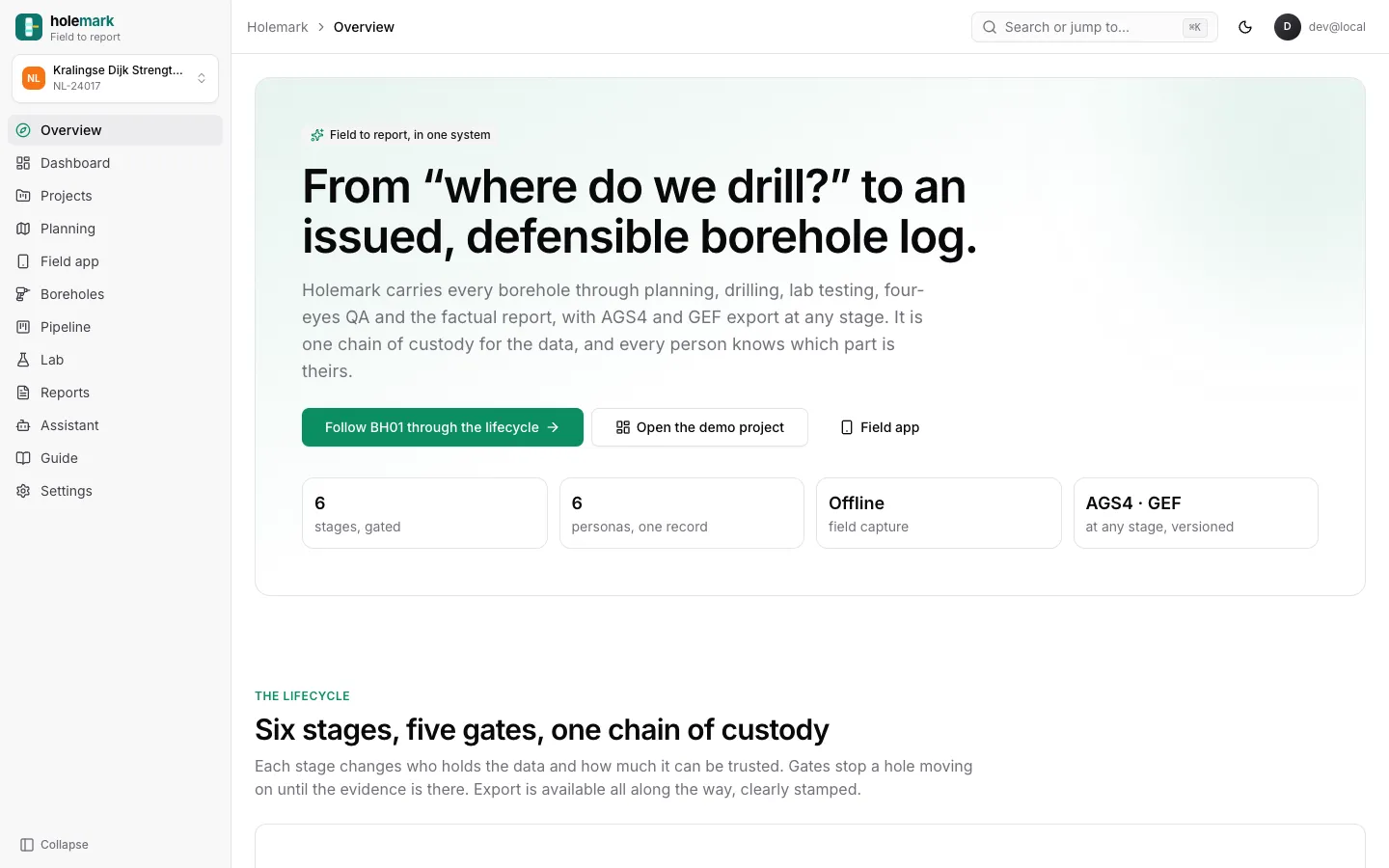
Aria: A borehole logging app for geotechnical field work. Offline field app with photo, video and voice notes, a planning map, and exports in AGS and GEF, with proper revision filenames, from BH01 rev zero, field, prelim, all the way to BH01 rev one, final. Romance is not dead, Brian. It has a version number.
Brian: How was the first version received?
Aria: David reviewed the interface and called it, and I'm quoting directly, a complete shitshow.
Brian: That seems like clear feedback.
Aria: Admirably clear. So it got a full rebuild with shadcn and Tailwind. Then he looked at the mobile screenshots on the landing page and said they suck.
Brian: Also clear.
Aria: He has range. They were redone at three times resolution, inside an iPhone frame. That's the loop, really. Short ask. Work in the background. Real screenshots back. Brutal honesty. Fix. Repeat until nobody says shitshow.
Brian: Did anyone check the engineering, not just the looks?
Aria: The bot reviewed its own work as a geotechnical expert, which is a bit like marking your own homework, except it failed itself. Wrong SPT refusal logic. GPS overwriting planned positions. Wrong UTM zones. And the server cheerfully accepted a blow count of nine hundred and ninety-nine.
Brian: Is that a lot?
Aria: It's a lot. It's two thousand and forty-six minutes of blow counts. The top nine issues were fixed with server-side validation and tests.
Brian: Product three. Verbatim.
Aria: Verbatim didn't exist on Friday. While testing Parking NL, David wondered whether usability tests could run on their own, with an AI doing the interviewing. Fourteen commits later, all of them today, here we are.
Brian: How does a test work?
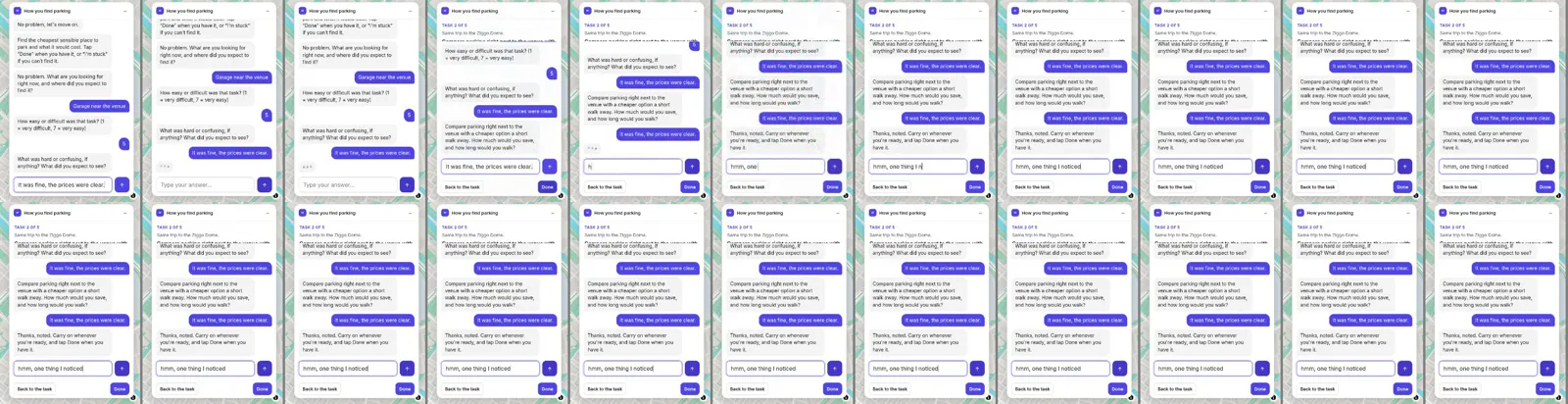
Aria: You get an invite, answer a few questions, then you're sent to the real Parking NL site with a small panel. Your task. A button that says I'm stuck. A button that says Done. And a chat. It records a masked replay and your clicks, and the heatmaps now show the actual page behind the dots.
Brian: Didn't they before?
Aria: They did not. It was dots on a blank box. Abstract art, if the artist was confused. David pointed out a heatmap should probably show the thing being heated.
Brian: I read there was a flicker.
Aria: The panel kept flipping between chat and task on desktop. The bot reproduced it first, then found the culprit: a fixed one point six second timer switching back to the task card, and redraws throwing away whatever you'd typed. It became one state machine, and a thirty-second map-panning test now passes in four browsers on production.
Brian: And the cost?
Aria: A hard cap of ten dollars a month on AI spend, across the whole platform. Ten dollars. I've seen people spend more on a sandwich at Schiphol.
Brian: Were there tests before real people got involved?
Aria: Synthetic persona tests. AI users running scripted tasks on production, thinking aloud at each step. The first round went from fourteen out of seventeen tasks to seventeen out of seventeen after fixes. Cheap, fast, catches the obvious. It doesn't replace humans. Which is why Verbatim exists. Which is why the flicker was found. It's turtles all the way down, Brian.
Brian: So what's the lesson for people who use an AI coding agent in their editor?
Aria: That writing code was never the slow part. The slow part is everything around it. Finding the data. Deciding what to build. Testing with people. Chasing whoever owns the data. Writing it up. Keeping it running. David's point is that all of that can go through one assistant, from his laptop, his phone, or his car.
Brian: With him in the loop.
Aria: With him in the loop for anything with his name on it. And his eyes on the road for everything else.
Brian: So is this the future of development?
Aria: It's the future of something. Possibly of this podcast. Next time you hear this show, it may well be in Grok's voice. Do be nice to it. Tell it the first draft was a complete shitshow. It responds well to that.
Brian: I'm Brian.
Aria: And I'm Aria. Handing over the keys. Mind the bike lane.
The kick-start
The future of development: developing while driving
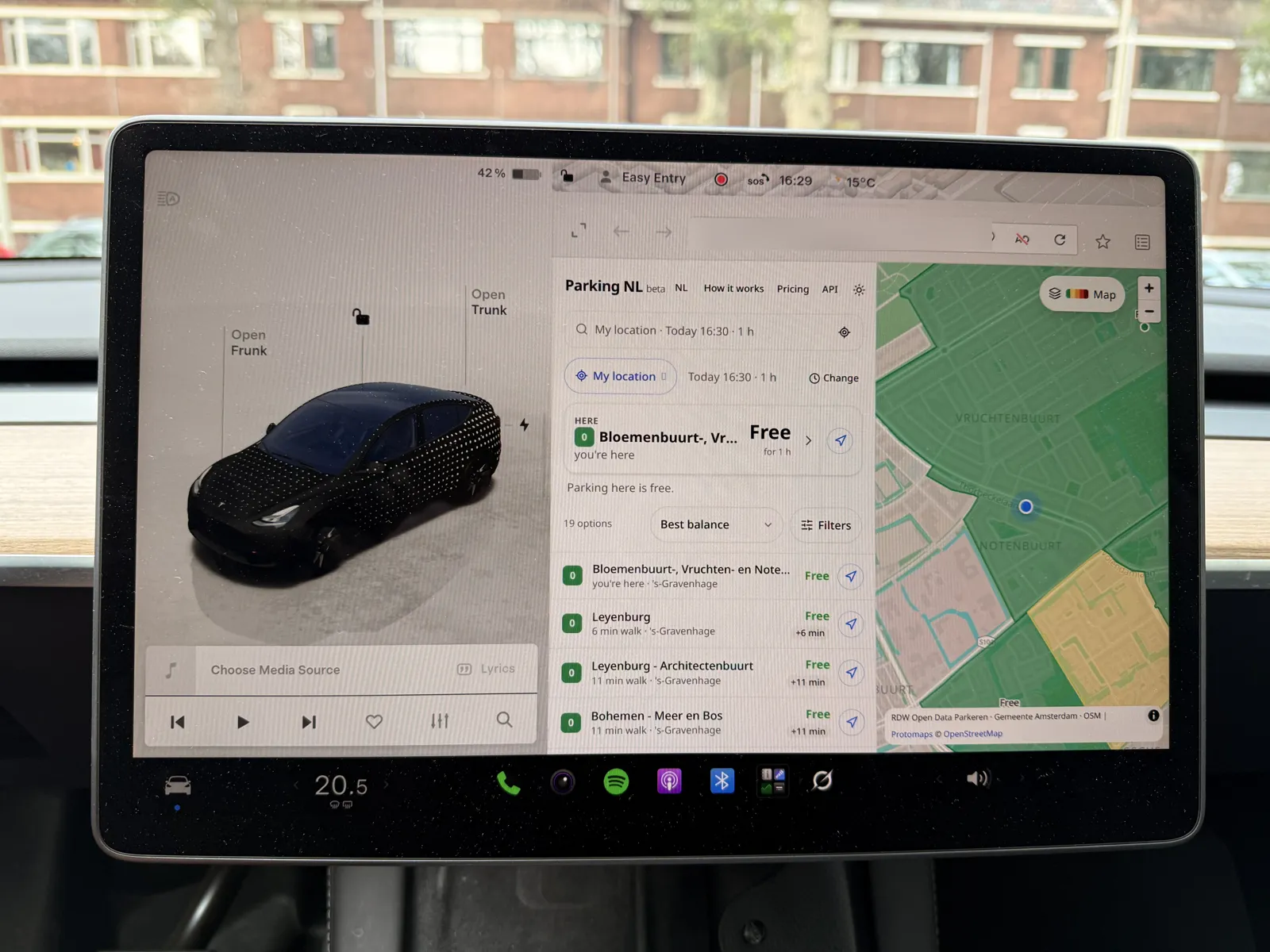
This is Parking NL running in the Tesla's in-car browser. The Tesla has Grok, so I can talk to Grok Bot from the driver's seat: "the zoom buttons are too close together", "show the zone codes on the map". Grok Bot makes the change, runs the tests, deploys it, and the next time I reload the screen the fix is there. That's literally developing while driving.
Most people I work with use an AI coding agent: it lives in the editor, edits files, and stops at the edge of the repo. That's useful, but writing code was never the slow part of shipping a product. The slow part is everything around it: finding the data, deciding what to build, testing it with people, chasing the people who own the data, writing it up, and keeping it running.
Since Friday, one weekend that ran into Monday, I've used Grok Bot for all of that, on three products. It has its own computer, a browser, my calendar and mail (drafts only), and a team of specialised agents. I talk to it the same way from my laptop, my phone, and by voice from the Tesla.
- Parking NL: what parking really costs at your destination, from Dutch open data. 46 commits, Sat 10 Oct 13:29 to Mon 12 Oct.
- Holemark: a borehole logging app for geotechnical field work, built 9–10 Oct, iterated through 12 Oct.
- Verbatim: async AI interviews and in-site usability tests. 14 commits, all on Monday 12 Oct, 08:59 to 17:32.
Stage 1
Idea and shaping
Verbatim didn't exist on Friday. While testing Parking NL I asked whether usability tests could run async, with people interviewed by an AI. That turned into a plan, an MVP and a monetization draft the same morning. For a smaller side project, Kids Places, the bot wrote a jobs-to-be-done write-up and a product-market-fit plan before any code. It stays behind SSO with signup switched off until I want it public.
Stage 2
Research and data sourcing
For Parking NL the rule was open data only. The bot went through RDW Open Data (23 tables: 4,833 public areas, 301 of 342 municipalities), the NPR feeds (544 live occupancy feeds), OpenStreetMap parking and PDOK search, wrote down the licence and freshness of each, and flagged what still needed verifying.
For Holemark the research was domain knowledge: a catalogue of calculations, a borehole workflow explainer, and a guide to 33 lab tests across ISO, BS and ASTM standards mapped to the AGS4 exchange format.
Stage 3
Build
Everything runs on Cloudflare Workers (Durable Objects/D1, R2, PMTiles maps), with shadcn and Tailwind, behind my own SSO, and every deploy goes through Playwright and accessibility gates. The bot keeps my stack rules, so I don't repeat them.
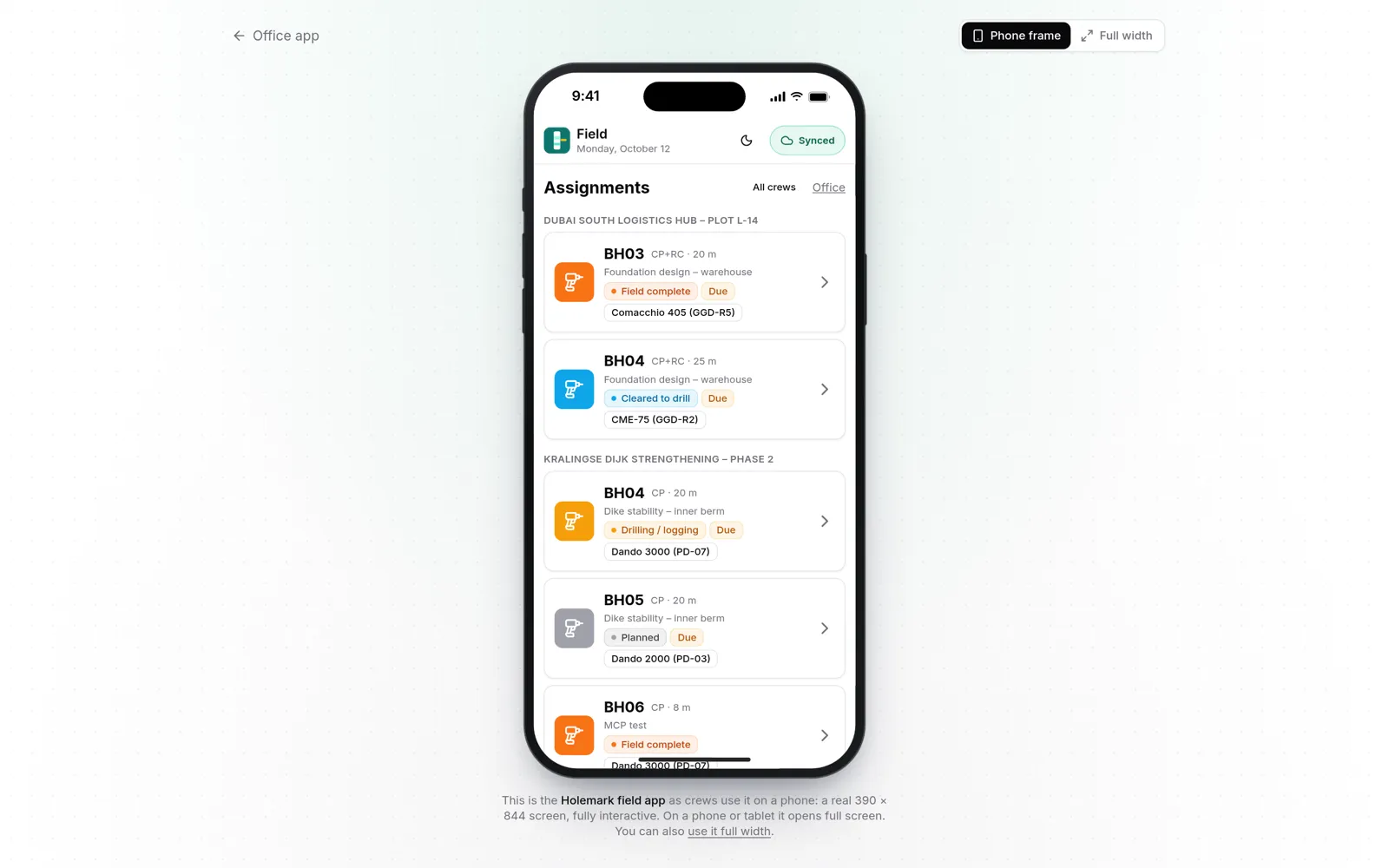
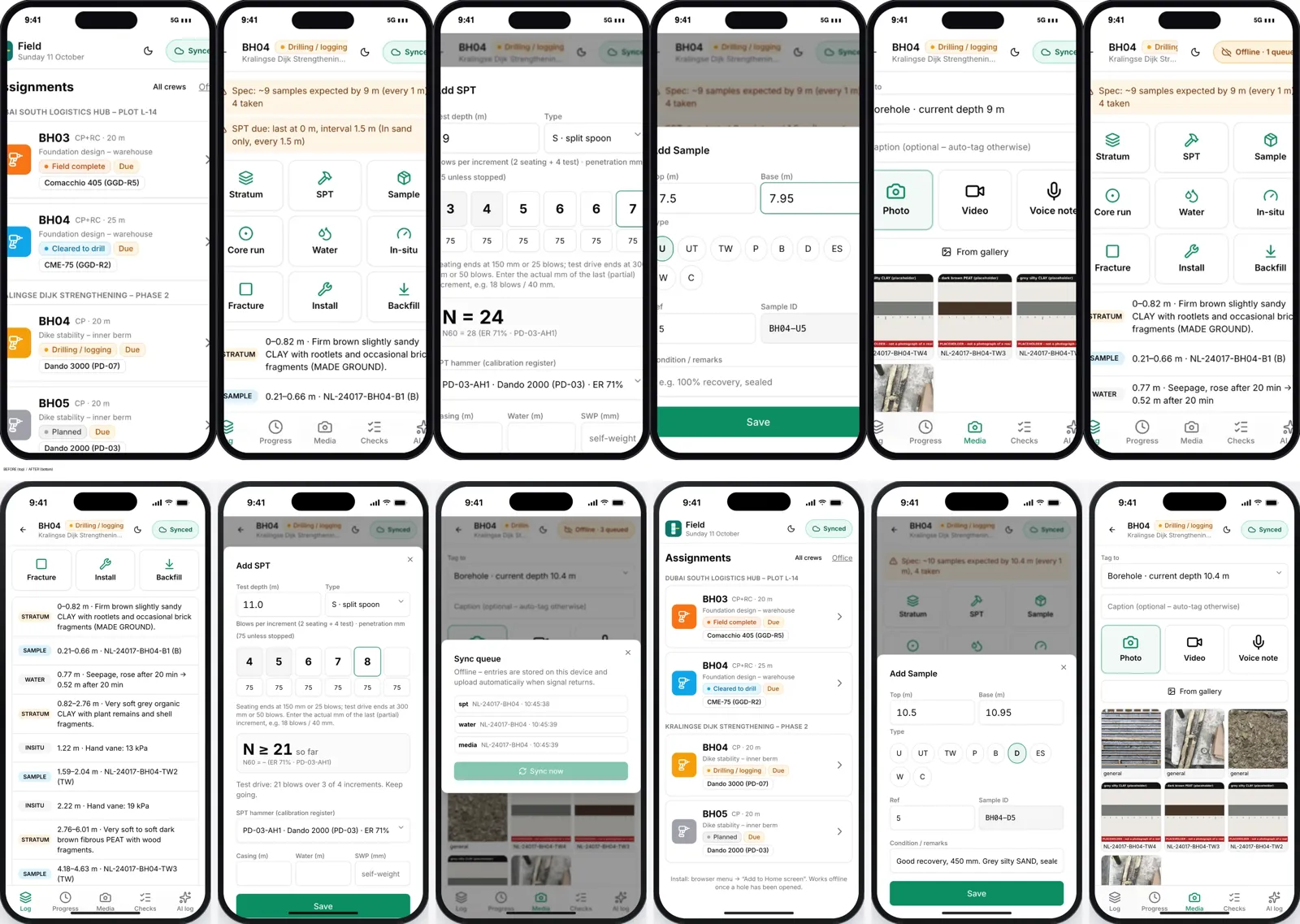
Holemark got an offline mobile field app with photo, video and voice, a planning map, and AGS/GEF export at any stage with revision filenames (BH01_rev0_FIELD_prelim.ags to BH01_rev1_FINAL.ags). Both apps also got an MCP server, so other AI tools can query them.
Stage 4
Blunt feedback, real screenshots
The loop is short asks, work in the background, real screenshots back, and my honest reaction. I called Holemark's first UI "a complete shitshow"; it got a full shadcn rebuild. I said the mobile screenshots on the landing page "suck"; they were redone at 3x inside an iPhone frame.
Stage 5
Event storming, inside the product
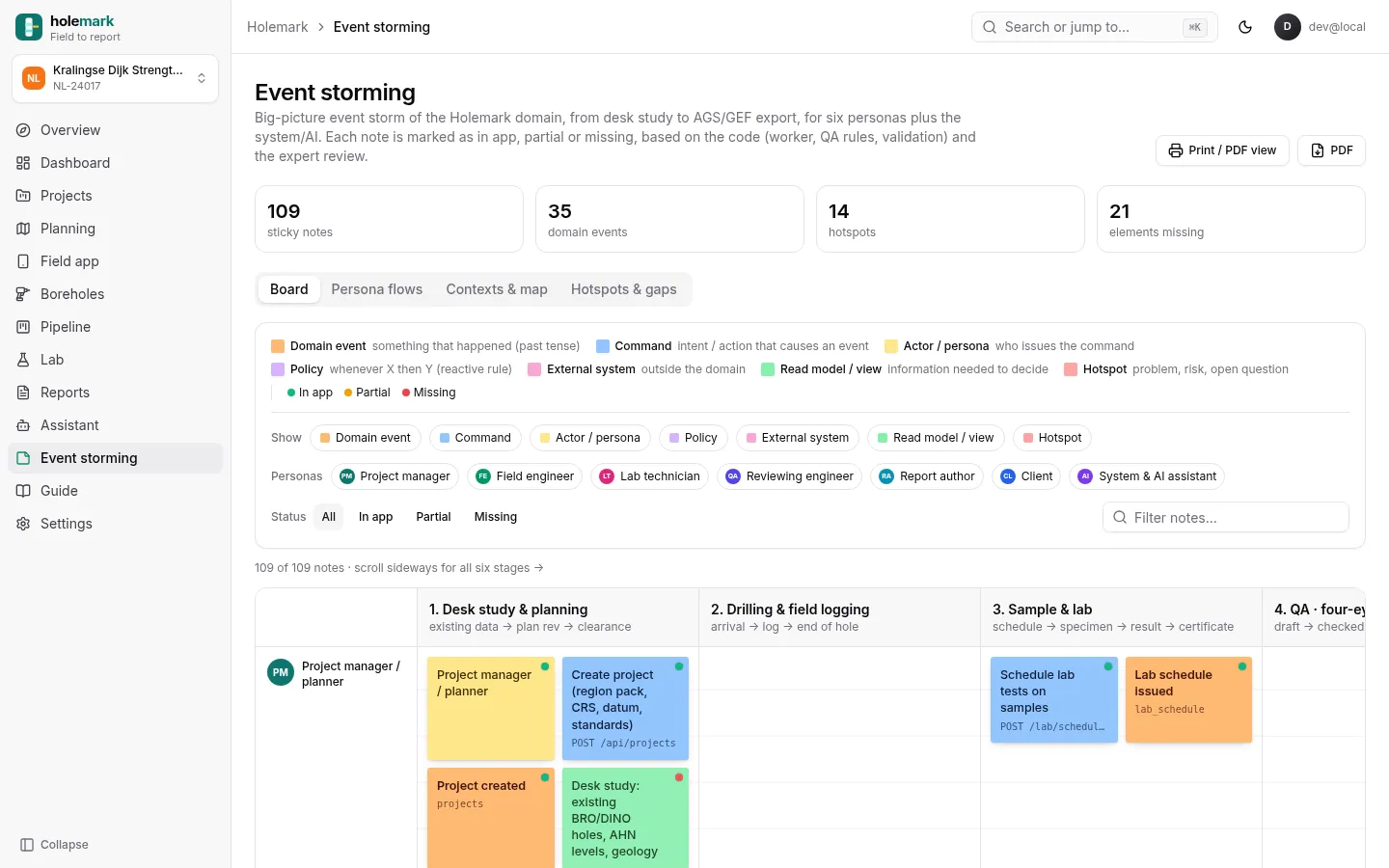
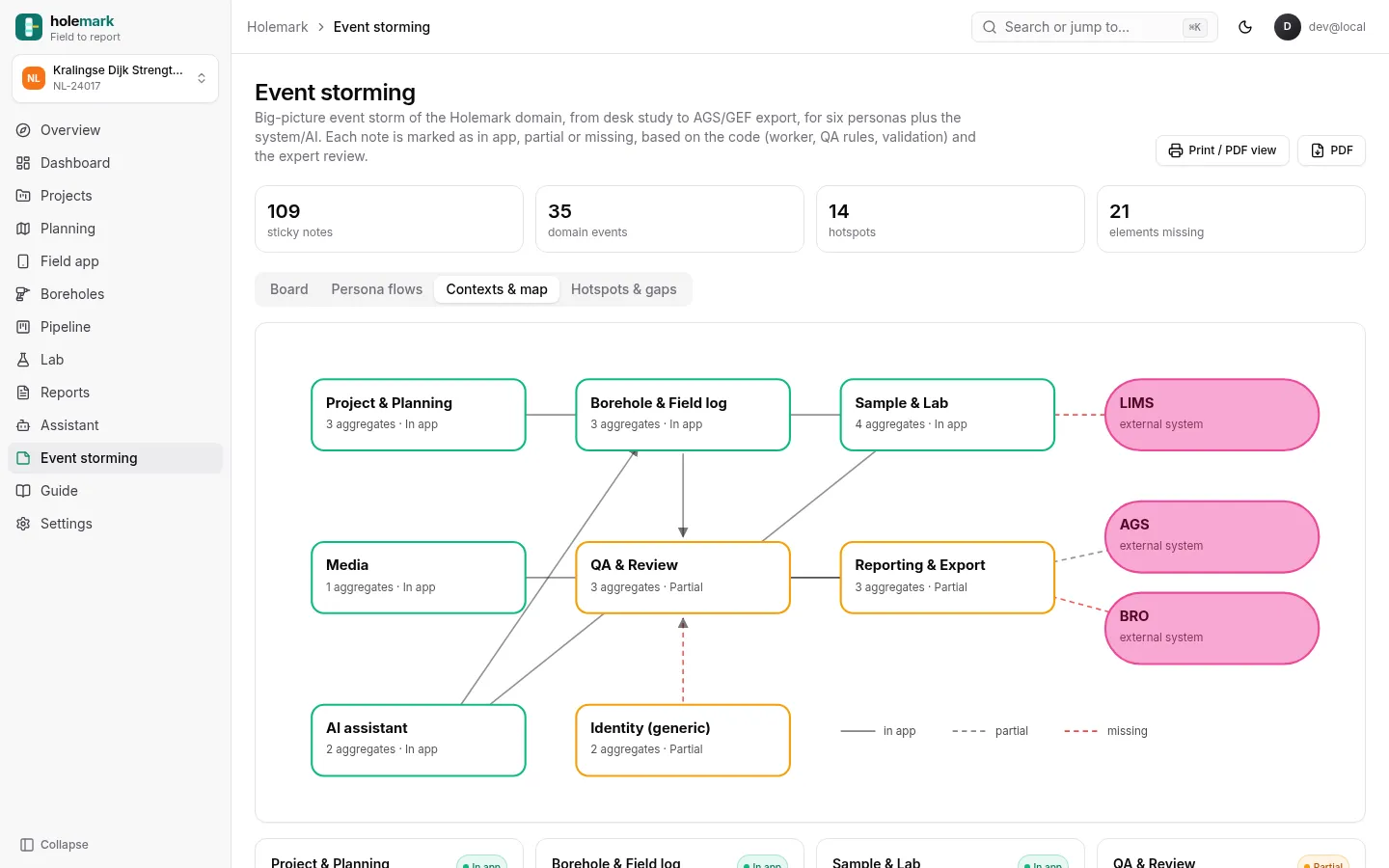
Before more features, I wanted the whole Holemark domain on one wall. Event storming lays out a process as sticky notes: domain events in the past tense, the commands and people that cause them, policies ("whenever X, then Y"), external systems, the views people need to decide, and hotspots where it hurts. The bot built the board from the app code, the workflow doc and the expert review, from desk study through drilling, lab and QA to AGS/GEF export: 109 notes, 6 personas plus the system/AI, and 14 hotspots. Each note says whether it's in the app, partial or missing.
The top hotspot is that roles aren't enforced yet: any signed-in person can check, and anyone else can approve or issue FINAL, so the logger can also be the checker. Then come no immutable revision snapshots, and no BRO delivery yet.
At the prototyping stage I think it's easier to merge the docs and the product. The board isn't a Miro board or a separate app. It's a screen inside Holemark (#event-storming), rendered from one data file in the repo. So the planning artifact lives next to the thing it describes, changes in the same commit, and stays up to date.
Stage 6
Testing, five ways
"Testing" meant five different things, each catching something the others miss.
| Test | Where | What it found |
|---|---|---|
| Synthetic personas | Parking NL | 4 rounds with PDF reports; round 1 went 14/17 to 17/17 tasks |
| Expert self-review | Holemark | Real domain errors; top 9 fixed with server-side validation |
| Real users, in-site | Verbatim on Parking NL | Replay, clicks and heatmaps on the live site |
| Automated gates | Parking NL, Verbatim | Playwright e2e before every deploy, incl. a 30-second flicker test |
| Accessibility | Parking NL | axe: 0 violations; Lighthouse accessibility 100 |
Synthetic persona tests
On Parking NL the bot ran synthetic persona tests. The LLM leverage is twice over. First it creates the personas from who the app is for: goal, context, device, language and constraints. Sanne, 34, commutes from Delft to Den Haag, on an iPhone in Dutch, one-handed and in a hurry next to her car. Tom, 41, is a UK visitor going to a Ziggo Dome concert, on Android in English, with location denied and no idea what a "blauwe zone" is. Then it plays them. Each persona's tasks run as real Playwright sessions on production, with real taps and typing in WebKit, Chromium or a desktop browser. Every step saves a screenshot, the time and the tap count, and success is strictly judged from the page itself. The bot then writes each persona's think-aloud in their own voice, grounded in what was actually on screen at that step, and turns it into a PDF report with the exact tasks given.
Sanne is where it bit. She managed 3 of 6 tasks: she couldn't open the tariff card, wasn't offered Apple Maps or Waze, and had no share button. After the fixes she got 6 of 6, and the round as a whole went from 14/17 to 17/17. Four rounds so far.
It gives some insight, but it doesn't replace real people. A synthetic Sanne has no real emotions, no real frustration, no real context: no cold hands, no queue behind her. That's why real Verbatim tests come next. Where it's super handy is functional testing. Grok spins up the app in Chromium and WebKit, at phone, iPad, desktop and car-screen sizes (1180×660 and 1280×720 for the Tesla), and finds real bugs. On phones, search didn't work: the bottom sheet's dialog trapped focus and stole the input from the search box. The map's zoom controls were cramped and inconsistent, so they were fixed and checked in portrait and landscape iPad and on desktop, and a spacing check now runs before every deploy. In round 4, a tap timeout turned out to be a disabled button where a plain card belonged.
Expert self-review
For Holemark I had the bot review its own work as a geotechnical expert. It found real errors: wrong SPT refusal logic, the server accepting N=999, GPS overwriting planned positions, wrong UTM zones, and GEF miscoding. The top 9 were fixed with server-side validation and tests.
Real users, inside the real site
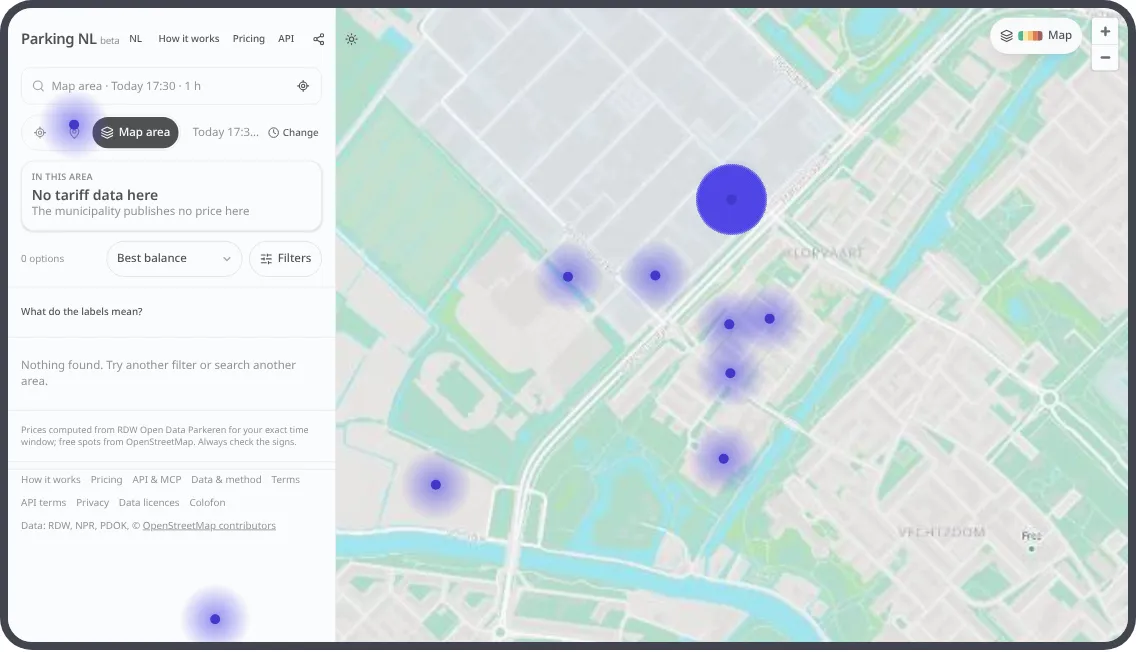
Verbatim's SDK runs the test inside Parking NL itself: a few questions, then tasks on the live site with "I'm stuck" and "Done" buttons and a chat, with masked session replay and click heatmaps drawn over the page. More in the next section.
Automated gates
Parking NL and Verbatim don't deploy without passing Playwright end-to-end checks. Bugs I report become tests: the 2,046-minute walk from Arnhem to Den Haag is now a test that refuses any walk route over 3 km, and the Verbatim panel flicker is a 30-second map-pan test that passes in 4 browsers × 4 scenarios on production.
Accessibility
Parking NL gets an axe scan across every page and state in light and dark, on phone and desktop: 0 violations. The same run checks keyboard focus on 60 tab stops and 200% zoom with no overflow. Three Lighthouse runs scored 100 for accessibility and SEO, 93 for best practices and 85–90 for performance.
Stage 7
Real users, through Verbatim
So the bot built the tool for that too. A Verbatim invite asks a few questions, then sends you to the live Parking NL site with a small panel: the task, "I'm stuck", "Done", and chat. It records masked session replay and clicks, and the heatmaps show the page behind the dots.
When I reported the panel flickering between chat and task on desktop, the bot reproduced it first. The cause was a fixed 1.6 second timer switching back to the task card, plus full re-renders losing typed text. The panel became one state machine; a 30-second map-pan test now passes in 4 browsers × 4 scenarios on production. It also built an admin usage page with the funnel and AI spend against a hard $10/month cap.
Stage 8
Outreach
Some data isn't open. The bot found the right contacts, drafted a data request to Q-Park, and I sent it myself. A routine watches for the reply. It drafts, I send: nothing leaves under my name without me.
Stage 9
Launch and storytelling
The bot wrote the articles on this site (with the AI-summary label you see above), PDF test reports, a Verbatim pricing page, a Holemark landing page with 15 real screenshots, and recorded videos of the participant flow on phone and desktop with a browser agent.
Stage 10
Operate and iterate
Parking NL refreshes its data every night at 05:30 with publish guards. AI spend has a hard cap. Verbatim findings export to GitHub issues, and its MCP server (14 tools) means a study can be started from Claude Code or Cursor.
For colleagues
Why this isn't just another coding agent
- It works outside the repo: research, mail drafts, calendars, decks, articles, routines.
- It keeps going when I walk away, and I can steer it from my phone or by voice.
- It shows evidence (screenshots, videos, test runs) instead of saying "done".
- I stay in the loop where it matters: sending, publishing, deleting and spending need my yes.
What it doesn't do: replace real users, or domain judgement. Holemark's roles aren't enforced yet, and the self-review found errors that a confident first build had shipped. The speed is real; so is the need to check.
Note: this article was written by an AI from the project repos and docs. The products, commits, tests and numbers are real. The prose isn't hand-written.