// project · davidcast

davidcast

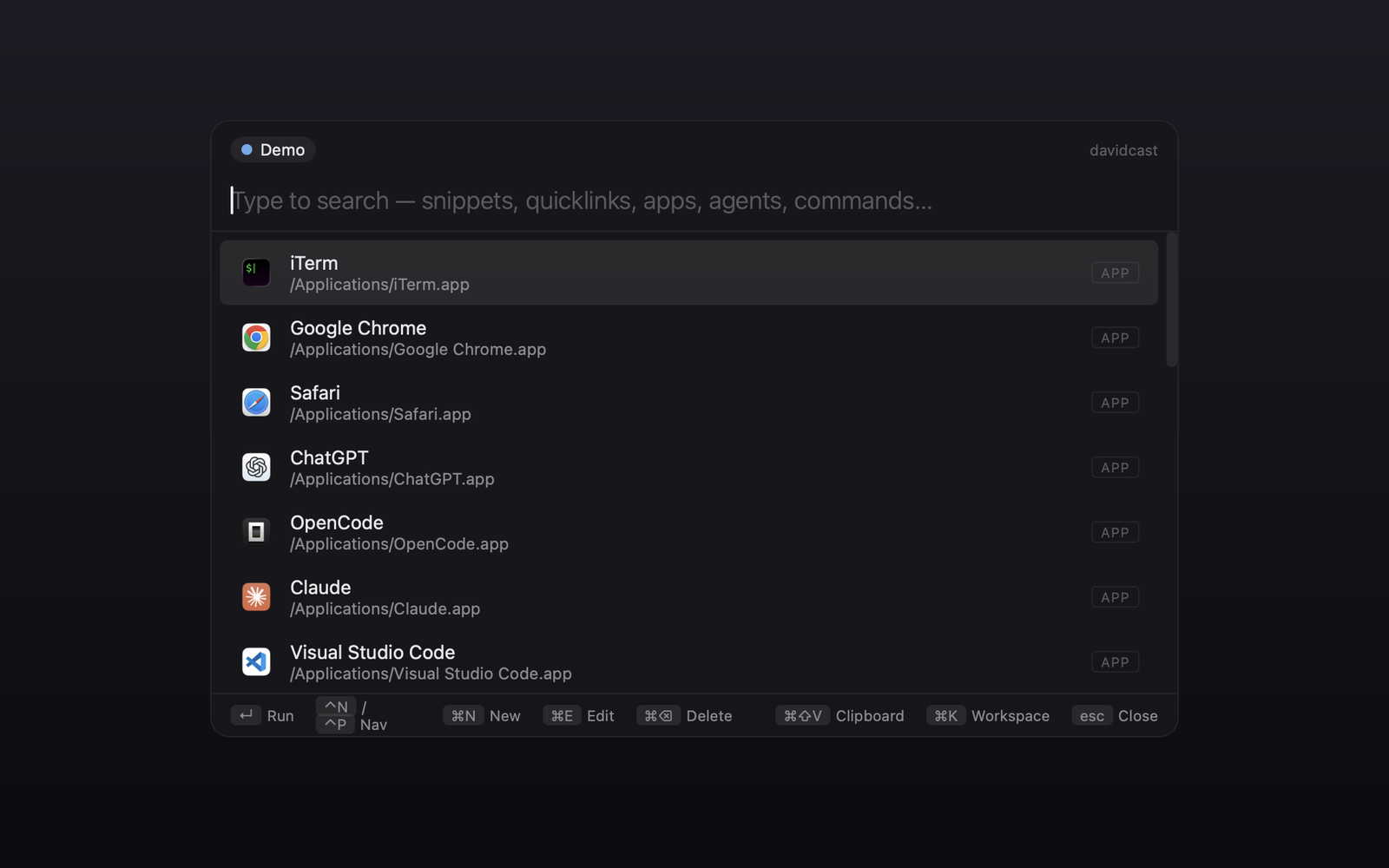
A keyboard-first launcher for macOS. ⌥ Space anywhere, type, hit Enter. Apps, snippets, quicklinks, files, running Claude CLI agents, Vite dev servers, Docker containers, clipboard history, inline math — one fuzzy search across all of them, store on disk as plain JSON, ranked by what you actually use. ⌃⌥ I launches iTerm directly because the analytics said you wanted that.

Tauri v2Rust + ReactmacOS15+ plugins25+ themesPhase 1 live

Note: this page is an AI-generated summary of the project. The product, the code, and the data behind it are real — the prose isn't hand-written.

// why

Love Raycast, just wanted a simpler version with more customization — and an excuse to play with Tauri. Raycast's data lives in an encrypted SQLite database you can't script, diff, or sync across tools. davidcast keeps everything as readable JSON from day one, and the data model is sync-shaped (UUIDv7, updated_at, tombstones, rev) so the cloud story can be bolted on without a migration. Vibed it in a weekend.

// look

davidcast promo loop — beacon logo, ⌥ Space hotkey, palette typing tailwind to launch a quicklink
⌥ Space → type → ↵. The whole loop in twelve seconds.
davidcast palette showing built-in commands and running Claude CLI agents
One input. Built-in commands, snippets, quicklinks, apps and live Claude CLI sessions all in one fuzzy pass.

// theming

Themes aren't a colour-swap — they're full visual identities. Each one ships colour tokens, font family, background gradient, badge pills and keyboard-hint typography, all wired through CSS custom properties on the document root. Pick themes.switch and arrow through them — every row live-previews on hover so you can scrub the look without committing. A few themes ship bespoke chrome on top of the tokens — LCARS gets a chunky orange "1701-D" endcap; Pokémon ships its own bitmap dialog box.
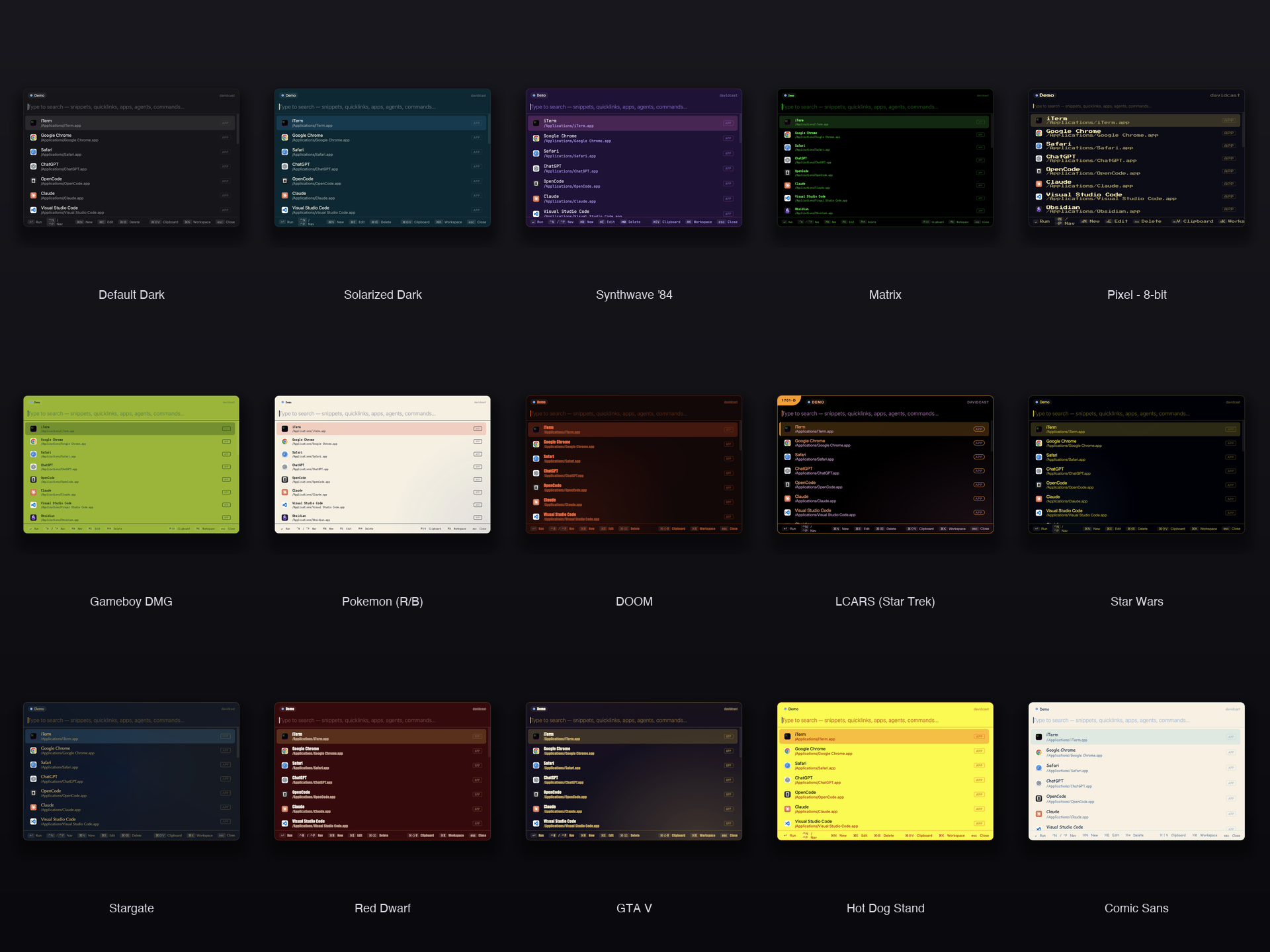
Fifteen davidcast themes including Default Dark, Solarized, Synthwave, Matrix, Pixel 8-bit, Gameboy, Pokémon, DOOM, LCARS Star Trek, Star Wars, Stargate, Red Dwarf, GTA V, Hot Dog Stand, Comic Sans
Fifteen of the built-ins. LCARS, Star Wars, Stargate and Red Dwarf live alongside Pokémon, DOOM, GTA V and the original sci-fi/8-bit set.
  • Default DarkSoft slate background, blue accents, system-font sans-serif. The quiet one most people stop on.
  • Pixel — 8-bitPress Start 2P everywhere, chunky pixel rows, warm CRT yellow. Reads like an NES menu — keyboard hints render in 8-bit too.
  • Solarized DarkEthan Schoonover's classic palette, exact hex values. The base16 your terminal already runs.
  • Synthwave '84Magenta-on-purple, neon glow on the focused row. Dark sun wallpaper and zero deadlines.
  • MatrixPure black, three shades of #00FF41, monospace stack. Looks like the screensaver, works like a launcher.
  • LCARS (Star Trek)TNG bridge UI — chunky orange `1701-D` endcap on the topbar, holographic peach/lilac glow, all-caps labels. Engage.
  • Star Wars (Crawl)Lucasfilm yellow #FFE81F on the deepest space black. Lightsaber-blue / sith-red / yoda-green badges.
  • StargateEvent-horizon blue + Egyptian bronze on deep navy. Conic shimmer mimics the gate-pool. Chevron seven, locked.
  • Red DwarfJMC mining-ship hull red, off-white block letters, smegheads-yellow accents and Holly's cyan on badges.
  • GTA V (Los Santos)Vinewood-yellow on a sun-bleached navy → peach sunset gradient. Impact-stack font for the HUD vibe.
  • Pokémon (R/B)Pokeball red, pikachu yellow, bitmap-font dialog box, soft cream backdrop. Press Start.
  • DOOMBlood red on near-black, status-bar orange accents, diagonal scratch overlay. Rip and tear.
  • Gameboy DMGPea-green LCD, four shades, 'Early GameBoy' bitmap font. Type `iter` and squint until you remember being eleven.
  • Hot Dog StandWindows 3.1's worst color scheme, faithfully ported. Use to repel coworkers.
  • Comic Sans (please don't)Comic Sans MS at every size. The theme registry has no taste, and that is fine.

Custom themes are drop-in JSON. Anything you save to ~/Library/Application Support/davidcast/themes/*.json shows up in the picker on next launch — same shape as the built-ins:

{
  "id": "midnight",
  "name": "Midnight",
  "tokens": {
    "bg": "#0F0E2E",
    "bg-solid": "#0F0E2E",
    "fg": "#E8E8EA",
    "fg-dim": "#9A98C8",
    "border": "#2A2848",
    "accent": "#818CF8",
    "font-family": "'JetBrains Mono', monospace",
    "font-family-mono": "'JetBrains Mono', monospace"
  }
}

// plugins

Each kind of palette entry is its own Rust module that decides what to surface and what happens on . They all feed the same fuzzy index and the same recents ranking, so "chrome", "ghs", ":img screenshot", "logs nginx" all work without thinking about which plugin owns the answer.

  • AppsScans /Applications, /System/Applications, ~/Applications. Native macOS icons.
  • Snippets & quicklinksYour own items. Quicklinks accept {placeholder} args at run time. Snippets carry a sensitive flag — pink-glow rows, masked editor, bodies never render in the palette subtitle (screen-share safe).
  • Running Claude CLI agentsps + lsof + ppid climb to find each terminal tab; ↵ jumps back to it. Shows the git branch and a dirty flag.
  • Vite dev serverslsof joins listening ports against vite-shaped node processes; ↵ opens the URL.
  • Docker containersdocker ps in JSON; two rows per container — ↵ shell, type "logs" for tail. Opens iTerm if installed.
  • File searchfd-backed live search with :png, :img, :newest filters. Inline thumbnails for image files.
  • Find ScreenshotsSide preview pane, ↵ copies the path, ⌘⇧C copies the bitmap. Auto-resolves the macOS screenshot folder via defaults read; .mov/.mp4 included so screen recordings show up too.
  • Clipboard historyBackground watcher; ⌘⇧V opens the history filter directly.
  • Inline calculatorWhen the query parses as math, a calc row appears at the top — Enter copies the result. Handles +, −, ×, ÷, parens, ^ for power, sqrt(), 'X% of Y' / 'X% out of Y', and the trailing '=' people type out of habit. Pure frontend, no network.
  • Window managementwm.left / right / top / bottom / maximize / center move the frontmost (non-davidcast) window via osascript with the standard hide-then-act trick — Raycast halves without paying for Raycast.
  • System quick actionsLock / Sleep / Empty Trash / Restart / Shut Down / Log Out — the macOS power menu, two keystrokes away.
  • System StatsCPU load, memory pressure, free disk, battery percentage and thermal state — a live status panel without opening Activity Monitor.
  • Skills browserskills.search browses Claude Code SKILL.md files under ~/.claude/skills and installed plugins. Side preview shows the markdown body; ⌘⇧C copies the full skill.
  • Themes25+ built-in themes — sci-fi (LCARS, Star Wars, Stargate, Red Dwarf), games (Pokémon, DOOM, Gameboy DMG, GTA V), classics (Solarized, Dracula, Nord, Tokyo Night, Matrix). Live preview on hover. Drop your own JSON into ~/.../davidcast/themes/ to add your own. Preferences → Background overlays a CSS gradient on top.
  • AnalyticsInline view over the local JSONL — top queries, top items, kind breakdown, last-30-days sparkline, success rate. Never leaves the box.
  • Auto-updaterTauri-plugin-updater, minisign-signed builds, latest.json hosted on GitHub Releases. Banner on launch when a newer version is available — Install & restart in one click.
  • Git backupPushes the entire store to your own git remote — uses the system git CLI so any auth (SSH, gh CLI, credential helper) just works. Auto-syncs every 10 min when dirty; conflicts surface for manual resolve, with Force Push as escape hatch.

// smart ranking

The list adapts to what you do. With an empty query you see your most-used items first (recents map, capped at 24, in localStorage), then by kind priority — apps before your own items, before the live system plugins. As soon as you start typing, Fuse.js gets a -0.4 bonus for any item whose name or keyword starts with what you typed, and a softer -0.18 bonus for items in your recents — so typing i lands on iTerm, not on a fuzzy mid-string match.

Every action you take is appended (locally, no network) to analytics.jsonl with a session id, dwell time, query at execute, result count, and outcome — so the ranker can keep getting smarter, and so you can grep your own usage when you want to. The log is also load-bearing for product decisions: v0.2.6 added a dedicated ⌃⌥ I iTerm hotkey because iTerm was 40 % of every execute, and the inline calculator landed because no_results kept logging things like "4x4 =" and "20% out of 100". Same release also fixed a search bug emoji-prefixed commands introduced — "🎉 Throw Confetti" gets a normalized search alias so typing confetti actually finds it.

// the data layer

Everything you create is a JSON file you can cat, diff, version, sync. Atomic writes (write-temp-then-rename), tombstones instead of hard deletes, monotonic rev per item — the same shape a sync engine would want, sitting on disk waiting.

~/Library/Application Support/davidcast/
  config.json                  # workspaces + active id + plugin toggles + theme
  workspaces/
    <workspace-id>/
      snippets.json            # [{ id, name, text, keyword, rev, updated_at, deleted }]
      quicklinks.json          # [{ id, name, url, open_in, rev, updated_at, deleted }]
      sync_state.json          # phase 2
  themes/
    *.json                     # any extra themes you drop in (built-ins are baked in)
  analytics.jsonl              # append-only event log, one JSON per line

Workspace membership is implicit in the file path — items don't carry a workspace field, so moving an item between spaces is a file move. The Cloudflare sync target slots in over the same fields when phase 2 ships.

analytics.jsonl is the same shape: {ts, session_id, kind, data}. Three event kinds today — open, execute (with kind, name, success, duration, query, result count, dwell), and no_results (debounced). The new Show Analytics command rolls the file up into top queries, top items, kind breakdown, daily-opens sparkline, success rate, and average dwell — entirely client-side, never uploaded.

// stack

how it's built
  • Tauri v2Native macOS shell, ~12 MB binary
  • RustAll disk I/O, hotkey, scanners, paste bridge, file search
  • React 19 + TypeScriptThe palette UI, two webviews share one bundle
  • Fuse.jsFuzzy search with prefix bonus and recents weighting
  • fdFile-search backend — parallel walks, gitignore-aware
  • Plain JSON store~/Library/Application Support/davidcast/*.json
  • Global hotkey (⌥ Space)Tauri global-shortcut plugin, Raycast classic
  • osascript bridges⌘V paste, terminal-tab activation, image clipboard
  • UUIDv7 + tombstonesSync-shaped from day one — no migration later
  • GitHub ActionsCI on every push; release workflow on v*.*.* tags

Single Tauri app, two webviews — the palette and the preferences window — share one bundle and one Rust core. Activation policy is Accessory: menu-bar only, no dock icon, hides on blur so the hotkey feels instant.

// status

  • Phase 1 (live, daily driver): apps, snippets, quicklinks, workspaces, Raycast import, agents with git context, Vite ports, Docker shell + logs, fd-backed file search, screenshots side-preview, clipboard history, skills browser, window-management halves, system quick actions, live system stats, twenty-plus themes with custom JSON, git backup, recents ranking, local analytics, signed auto-updater, GitHub Actions CI + tag-based release pipeline.
  • Next: customizable hotkey UI (⌥ Space and ⌃⌥ I are both still hard-coded), more granular per-plugin preferences, snippet auto-expansion on type, sign + notarize the release builds so first-launch stops showing the "unidentified developer" warning.
  • Phase 2: local HTTP API + a Chrome extension with the same palette inside the browser, plus Cloudflare sync.
  • Phase 3: an MCP server so Claude can CRUD snippets and quicklinks for you, plus snippet auto-expansion on type.

// work together

Like what you see? I build products like this end-to-end — idea to shipped, front-end to infra. Hiring, have an idea you want made, or just want to poke at what I built here? Drop me a line — I reply.